


Affiliate Disclosure As a Plugin Boutique and Amazon Associate I earn from qualifying purchases. This post may contain affiliate links. For more details, refer to my Terms page.
We take a look at the reverb plugin from Eventide which makes sounds big!
This is a review of the reverb plugin from Eventide Audio called Blackhole covering presets, alternative options and neat features.
Jump to:
Introduction to Blackhole
I wanted to review some more of the Eventide range following my experience with the Harmonizer 910 review as there is something I really like about these plugins. Eventide seem to offer a feeling of authenticity - the same vibe I get about hardware from Roland. If it has the Eventide name on the packet, I know I'm going to like it.
They say on their site "This famed, massive reverberator first saw the light of day as an algorithm in our rackmount DSP4000"
Getting Started with the Eventide Blackhole review
This review was done with a trial of the product - I took a 14 day trial from Eventide to make sure it was something I would use. The installation takes place as normal, picking VST version (2 or 3) and offering plugin presets as part of the install. The licensing is handled via iLok. I'm not a fan, but I get why this is a popular choice from plugin developers.
Overall, I was up and running in under 5 minutes. The plugin is not a huge install size and I was using a Windows 11 machine and Bitwig Studio 5.3.13 as my DAW.
Notable Features of Blackhole
- BPM link - sync up the effects to the timing of the music allowing a little extra rhythm and flow.
- Gravity control - this nifty little feature reverses the arrow of time by inverting the decay
- Mono and stereo built in - Use this to switch between mono and stereo effects.
For a little FX plugin this certainly packs a punch. Lots of features are contained in a simple interface.
The BPM link utility is really creative but for extra "reality" I found adding a little swing or notching out of perfect timing was a simple but effect way to make the audio sound less robotic.
iOS version available - Eventide Blackhole has an iOS version available in the app store.
Presets Available for Blackhole
There are a nice range of factory presets within Blackhole. The installer gives the option of including presets in the install or not so it's entirely up to you.
The presets come from a selection of artists and then are broken down by type of preset for specific instruments.
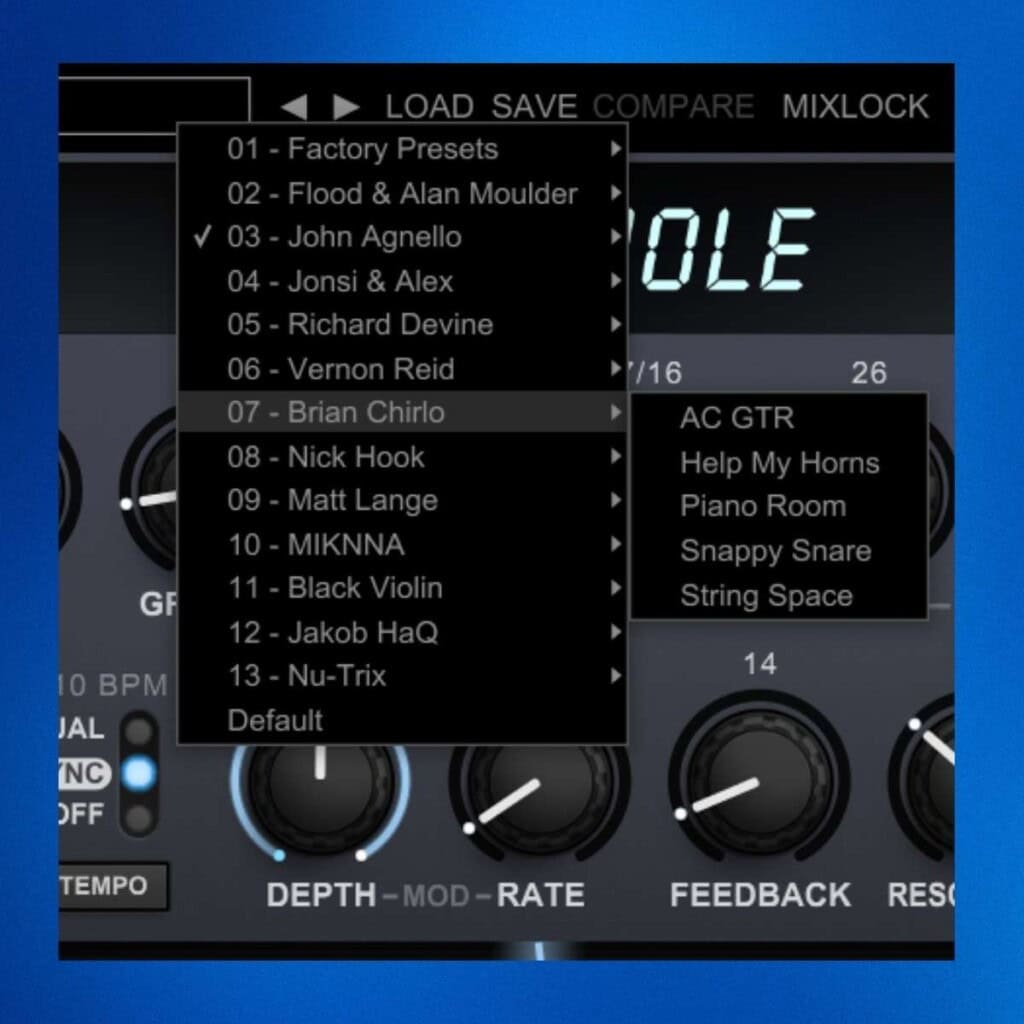
My suggestion for first time users would be to try this on guitars or keyboards in your mix to get a feel for how this sounds.
Alternatives Available to Eventide
Soundscape and large hall style reverbs are available across the board from a number of manufacturers. These come in both free and paid versions. My favourites include Valhalla Reverb and also there is a new one called Dimension from Excite Audio which looks to be one I'd be keen to try out.
Where can I use Blackhole in my mix?
Blackhole is a great plugin to add ambience to a soundscape or pad. It lifts the audio to make the sound surround you. It also works really well on vocals.
Review Summary
Eventide Blackhole Reverb

The space age reverb from Eventide offers a huge amount of sound for a mix. We check the plugin features it out in this Eventide Blackhole review.
Price: 35
Price Currency: GBP
Operating System: Windows, Mac
Application Category: VST FX Plugin
5
Pros
- Lots of choice to create musical effects in a mix.
- 50 plus presets included, with the ability to save your own.
- Kill switch allows for switching off and on and can be automated.
Cons
- Requires ilok for activation which adds complication.
Where To Buy Eventide Blackhole
The plugin is available directly from Eventide Audio or you can purchase from online retailers such as Plugin Boutique. Other retailers are available too.
Buy Blackhole
Links marked * may be affiliate links. They cost you nothing extra, but do help fund my site. Learn more how I use affiliate links.





Leave a Reply