

Affiliate Disclosure As a Plugin Boutique and Amazon Associate I earn from qualifying purchases. This post may contain affiliate links. For more details, refer to my Terms page.
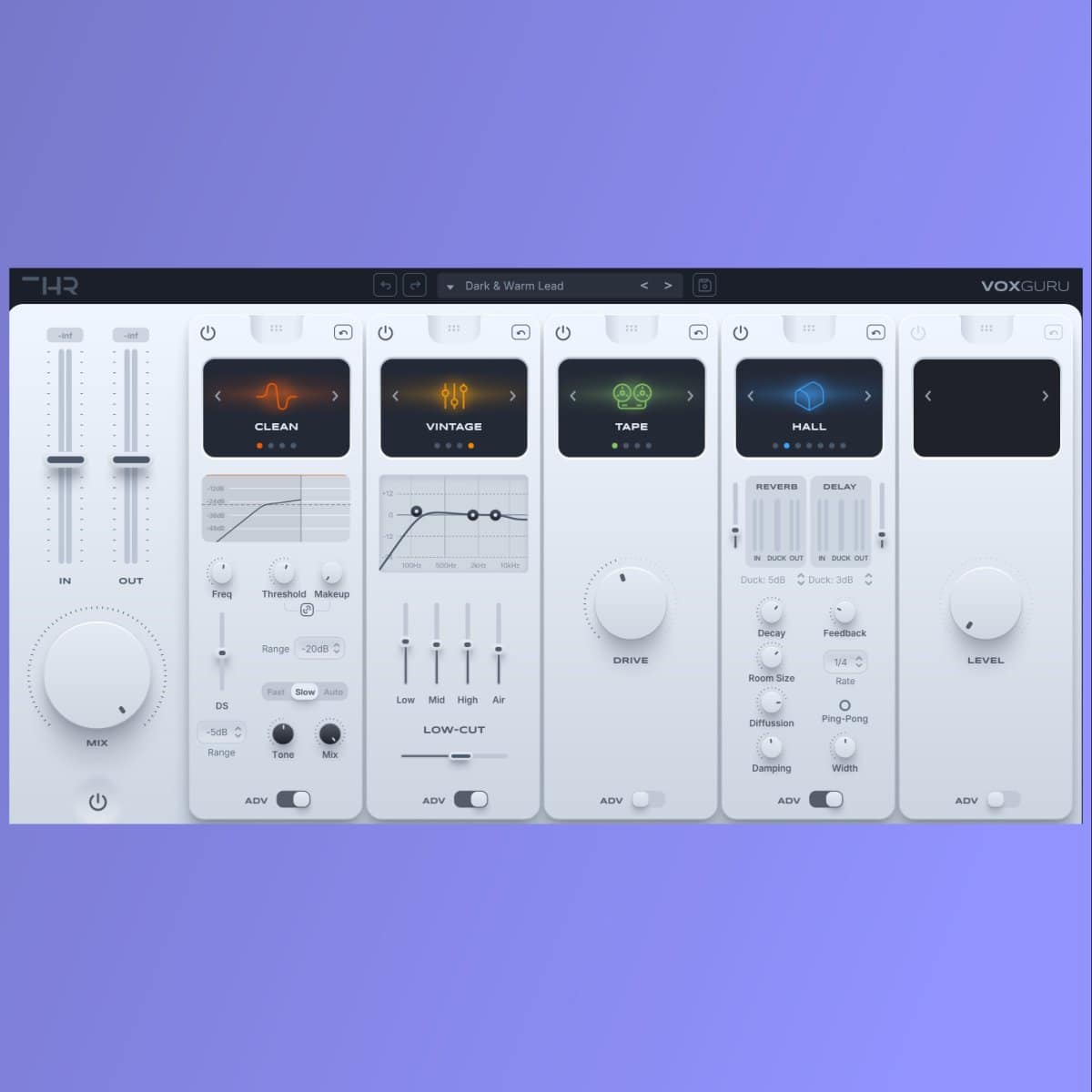
A new plugin on the market, the VoxGuru vocal processor is an effects plugin aimed at use in vocal chains. Offering a variety of effects out of the box this plugin looks to be a useful tool for many producers.
This is a THR VoxGuru Vocal Processor review covering an overview of the features along with the presets available and how the plugin performs from installation to loading into a DAW. All plugin tests were conducted manually.
TL;DR: THR VoxGuru Vocal Processor
Score: 4.8 / 5
VoxGuru is an all-in-one vocal processing plugin from THR with five modules, 25 algorithms and over 600 presets. It handles pitch correction, harmony, doubling, effects and dynamics in a single window, which makes it a genuine alternative to building a vocal chain from separate plugins.
Best for: producers who want a fast, preset-led vocal chain without stacking five plugins on a channel.
Not for: engineers who need surgical, individual control over each stage of processing.
Bottom line: strong preset library, effects module is the standout, and it earns a place in a working vocal chain. Check the current VoxGuru price*.
Jump to:
Introduction to the THR VoxGuru vocal processor review
THR - or The Home Recordings as they were once known - are a new plugin developer on my radar. Not to say they have not been about for a while but certainly new to me. They develop plugins that people need and much like the Klanghelm range of plugins, they are not huge in size but have a big impact when it comes to performance.
My initial though about this plugin was it was going to be a lot like Lifeline Expanse due to the look and feel of the images I'd see, but I think there is more to it than that.
Getting Started with VoxGuru
I was impressed with the packaging and delivery of this plugin. It has a small footprint for the download and comes in a windows installer package (for the windows platform obviously). There is also support for Mac too and offers VST3 and AAX installs.
Let's be clear on the installation, there is obviously a list of items which show in the initial plugin install (as seen below). Without reading the instructions it's not obvious that you get the main VoxGuru plugin as a bundle, but then also you get each section of the VoxGuru as a standalone plugin too.
When installed in the DAW, these show as separate plugins and loading, for example the EQ module, I was prompted to add another licence key. You can use the same key. This is not a problem to do but it would be nice if the main key unlocked all 5 of the modules rather than needing to unlock each one individually. They lose .2 of a star in the review for this, harsh maybe? But it could be slicker.

Once installed, the plugin was available straight away and able to be dropped on a mix track.
You can check the current VoxGuru price on ADSR Sounds*.
Notable Features
- Advanced Mode switch - Simple & Advanced User interfaces
- 25 Algorithms
- Clever FX modules
During this THR VoxGuru vocal processor review I wanted to have a go with the FX module specifically as I love a bit of FX on a vocal track. Have a listen to the two settings below. One was putting it through the Phone effect and the other was adding some Harmony in the key of F to widen the track.
When listening to these demos it is sometimes better to use headphones or studio monitors.
Phone FX
Harmony in key of F
As you can hear from these examples the effects are significant when applying to vocals. There are so many choices to try out that demonstrating them all would be a big job.
Presets Available for VoxGuru
Contained within the basic package are 600 presets. You need to make sure to tick the box to install these when first installing the plugin as they are not selected by default.
The selection works well for all kinds of music and offers a mix of genres and styles. Also catering for vocal ranges whether it be male or female, major and minor keys.
Furthermore there are opportunities to tweak presets provided for simple tasks like adding saturation to a vocal or some EQ. Use the presets as a base to start with and then work up from there to get a great sound on your vocal chain.

Cheaper alternatives to VoxGuru
VoxGuru bundles five processing stages into one plugin, which is where a lot of its £89 price sits. If you only need one or two of those stages, you can build a similar chain for less, sometimes for free. Here is where each module can be replaced.
Pitch correction
GSnap (free, Windows and macOS) covers basic pitch correction and the hard-tuned effect. It lacks the polish and speed of a paid tuner, but for producers who only occasionally need pitch correction, it does the job.
MAutoPitch by MeldaProduction (free) is a cleaner option with a more usable interface and a subtle mode for natural correction as well as a harder effect setting.
Harmony and doubling
Harmony Engine by Antares is the industry standard but sits above VoxGuru on price. For a cheaper route, Waves Harmony frequently drops to under £30 in sales and covers most harmony needs. MVocalStrip by MeldaProduction includes a basic doubler within its free vocal chain.
Vocal effects
If the FX module is the part of VoxGuru pulling you in, XLN Audio RC-20 Retro Color is a common alternative, particularly for lo-fi, radio and vinyl textures on vocals. Full breakdown in the XLN Audio RC-20 Retro Color review.
For modular vocal effects with a similar preset-led approach, Excite Audio Lifeline Expanse covers texture, re-amping and space in one plugin. See the Lifeline Expanse review for how it compares.
Dynamics and tone shaping
For compression and saturation on vocals, Klanghelm MJUC at around £20 handles the character side, and Klanghelm SDRR2 at a similar price adds saturation across tube, digi, fuzz and desk modes. Both are covered in the Klanghelm MJUC review and Klanghelm SDRR Saturator review.
The free route
If budget is the main blocker, a workable free vocal chain looks like:
- MAutoPitch for correction
- MVocalStrip for basic doubling and de-essing
- TAL-Reverb-4 for space
- Voxengo OldSkoolVerb for a plate character
This will not match VoxGuru's speed or preset library, but it will get a vocal sitting in a mix for zero cost.
When VoxGuru still wins
The reason to pay for VoxGuru rather than build a chain from cheaper parts is workflow. Loading five plugins and dialling each one in takes longer than clicking through 600 presets in a single window. If vocal production is a regular part of your work, that time saving is where the £89 earns its keep.
Who Uses This Plugin?
While this is a new plugin on the market I would expect a variety of music producers would look to be able to use this plugin. The effects are amazing and provide a real level of quality to the end mix.
There may be the opportunity to process this on a live feed too and would help a vocalists performance when playing live (if routed through the appropriate channels).
For the experimental producer, there is nothing to say that this can't be used on other elements of a mix. Give it a try on some synth or a drum kit. Check out this drum loop with the effects added on:
Experimenting with a drum loop
Hopefully this THR VoxGuru Vocal Processor review will give you some inspiration on where you can use the plugin and help improve your mixes. Keep being experimental and know that just because it is a vocal processor plugin, it does not limit to where it can be used. Some of the best music was made as happy accidents!
THR VOX Guru Video Review
A brief overview of the plugin
This video is a demonstration of how the plugin works with various presets and gives an example using a female vocal sample.
Review Summary
THR VoxGuru Plugin Review: Vocal Processor Tested
A hands-on THR VoxGuru review. We test this vocal processor plugin, its 5 modules, 25 algorithms and 600 presets, and show where it fits in a vocal chain.
Operating System: Windows, Mac
Application Category: Audio Plugin
4.8
Pros
- Great harmonics feature
- Simple and intuitive interface
- Easy to get up and running
Cons
- If using separate modules then they need activating individually
- No VST2 support
Where To Buy VoxGuru
The VoxGuru plugin from THR is available directly from the THR website or you can purchase from online retailers such as ADSR Sounds*. Other retails are available too.
Buy VoxGuru
Links marked * may be affiliate links. They cost you nothing extra, but do help fund my site. Learn more how I use affiliate links.
4 responses to “THR VoxGuru Vocal Processor Plugin Review”
-

Loved this plugin. Thanks for the details in the review.
-
My pleasure Dave. I hope it was useful.
-
-
Where are all the plug-ins that were advertised? Plenty of paid praise but no tutorials provided by THR on the best way to use the product. Buyer's remorse is a 10, product itself is a 3.
-
Hi Mickey,
Thanks for the comment. I'm just trying to understand a bit further about all the plugins question. This is only one plugin but it features various elements such as EQ, dynamics, distortion etc.
I can't really comment further on the THR documentation other than I had to read a bit more of it before I understood how the various elements are installed (from what I recall, it was a while ago now). I make reference to that part here: https://audioblob.com/thr-voxguru-vocal-processor-review/#getting-started-with-voxguru
As for the buyers remorse - sorry to hear that you have that. Although I think it would be a great rating to add as a star rating for future reviews if you don't mind me pinching that idea!
The THR reviews site page are mixed - maybe its worth an email to their support to give them some feedback? https://thraudio.com/reviews/
-





Leave a Reply