


Affiliate Disclosure As a Plugin Boutique and Amazon Associate I earn from qualifying purchases. This post may contain affiliate links. For more details, refer to my Terms page.
One of the biggest in the industry, this Shadow Hills Mastering Compressor review takes a look at what is on offer and why you need this for your mix.
This is a Shadow Hills Mastering Compressor review to look at the VST plugin version of the classic yet legendary hardware compressor.
Jump to:
Introduction to Shadow Hills
Brainworx have created this plugin as a remodel of the original compressor unit. The general view is that the Shadow Hills Mastering Compressor is the go to compressor in the rock industry. The original hardware compressor can be heard in use on records by Radiohead, Foo Fighters, Beck, Green Day, Coldplay and many more. This is your chance to own a virtual version of this plugin, crafted meticulously to get the same tone and transients achieved with the original.

Getting Started with the Shadow Hills Mastering Compressor review
The installation is done as a part of the Plugin Alliance installer package. You have the option here to choose the version of plugin you want, 32 bit, 64 bit, VST 2, 3, AAX. All are supported in Windows and Mac and work smoothly. Installation foot print is really small and the whole plugin is under 20Mb.
Notable Features
- The dual compressor option
- Lack of presets drops the score a little
- Sidechain built in
The dual compressor feature was something I liked with this plugin. This offered of a couple of varieties of compressor methods. One offers a way to control threshold and gain where the other offers more control in the attack ratio and release parts of the compression features. Use these individually or in combo to provide various compression methods.
Side chain facilities are built into the Shadow Hills Compressor plugin (this was not a feature in the original). The sidechain feature is useful when you do not have a DAW capable of doing this. However even if your DAW can do sidechaining, the built in sidechain features (parallel, filter and external) offer various ways to cut off signal depending on what you want to impact.
The sidechain also has a nifty filter by Hz option, so you can choose what frequency you want to block at, anything below will be filtered out.
Presets Available in the Shadow Hills Compressor
There are no presets within the Shadow Hills Mastering Compressor plugin so there is nothing to really get you started. I think this plugin is probably aimed at a more advanced producer who has the foundations of compression fully understood. Other plugins will help you learn this but once you do understand the fundamentals, this plugin comes in to it's element on the mix.
If you do have a setting you like once you have tweaked some dials, it is possible to lock this in and use the A B C D panes to set variations and switch between settings. It's nice you can copy and paste the config between tracks too. This means if you have a setting you like within the Shadow Hills Compressor on a drum track, you can open up another version of the plugin on a different track and paste that config in.

I've done a couple of example areas of a mix where I have isolated the sound for a synth and also some drums. Use headphones or studio monitors to hear the nuances in the variations, but hopefully these give you a taste of what to expect.
Drum Bus Example
Synth Example
Alternatives Available
For a lower cost alternative to the Shadow Hills Mastering Compressor you can check out the SDRR2 plugin and the MJUC compressor plugins from Klanghelm. Both these offer variations of effect which the Shadow Hills compressor can provide.
Top Tip - Use this plugin along side Wavesfactory Trackspacer for a clear and crisp mix with ease.
Where can I use the Shadow Hills Compressor in my mix?
The Shadow Hills Mastering Compressor is best placed - clue is in the name - on the master buss. This means the part of the mix where all the sound gets routed through.
Who Uses This Plugin?
We've learned from doing some research in this Shadow Hills Mastering Compressor review that plenty of bands from over the decades have used the original compressor plugin. If you want to give it a try I'd recommend seeing if you can get a sale version of the plugin (they do pop up from time to time) and get it on one of your mixes.
Review Summary
Brainworx Shadow Hills Mastering Compressor
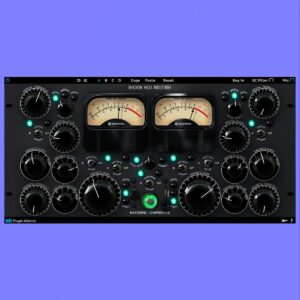
We check out the daddy of the rock compressor world. The Shadow Hills Mastering Compressor review looks at what this plugin can do for your mix.
Price: 139
Price Currency: GBP
Operating System: Windows, Mac OS
Application Category: VST Compressor
4.5
Pros
- Great plugin for rock and bass heavy mixes
- Dual compression settings to offer various compression methods
Cons
- Lack of presets included make this less intuitive
Where To Buy Shadow Hills Mastering Compressor
The Shadow Hills Mastering Compressor plugin is available directly from Plugin Alliance.
Buy Shadow Hills Mastering Compressor
Links marked * may be affiliate links. They cost you nothing extra, but do help fund my site. Learn more how I use affiliate links.


Leave a Reply